|
Many-to-Many
Forms (Cont'd)
The
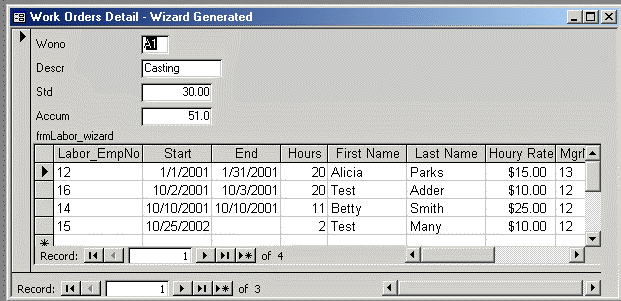
wizard generated the following form. Note that there are fields from
three tables: work_orders, labor, which is the intersection table,
and employees. When you type in a new employee number the name and
wage fields, etc. will be filled in automatically! The same would
apply to relationships involving invoices, line-items and parts or
any other similar many-to-many situation.
Access can do
this because it has built, behind the scenes, a query linking the
labor intersection table and the employee parent. This query is then
used as the record source for the subform. In this case the
relationship is better thought of as many-to-one. That's often called
a lookup which is sort of the reverse of parent-child. When you type
in the employee number, the corresponding values in the lookup table
are pulled in to satisfy the query.
The next
section examines these many-to-one forms in a little more detail.
Many-to-One
(Lookup) Forms
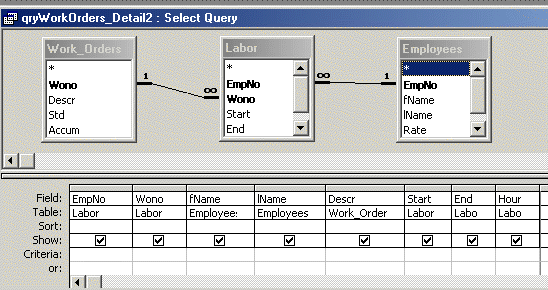
First the query. The following query joins three tables. The labor
table is an intersection table. The primary key is empno, wono.
Empno and wono are also foreign keys referencing the work_orders and
employees tables.
Continue to page 5 - many to one forms con'td... |

